Yes, you can separate two voices in one audio file. Upload the conversation to Seply, choose a separation mode, then preview and download a WAV track for each speaker. The tracks keep the original timing, so you can edit the voices together later. Results depend on the recording, especially when people talk at the same time.
This guide covers spoken conversations recorded with one microphone or saved as one mixed file. Separating singers or instruments from a song is a different task.
The workflow: upload one mixed recording → choose Standard and the speaker count → preview and download two WAV files. Follow the steps, or listen to the Standard example.
Separate the voices in three steps
1. Upload your recording
Open the speaker separation workspace, sign in, and choose an audio file such as MP3, WAV, or M4A. Compatible video files also work. Use the original recording when possible and only upload material you own or have permission to process.
You do not need to split a mono file into left and right channels first. If both voices are already mixed together, copying them to two channels does not isolate the people.
2. Choose the mode and check the estimate
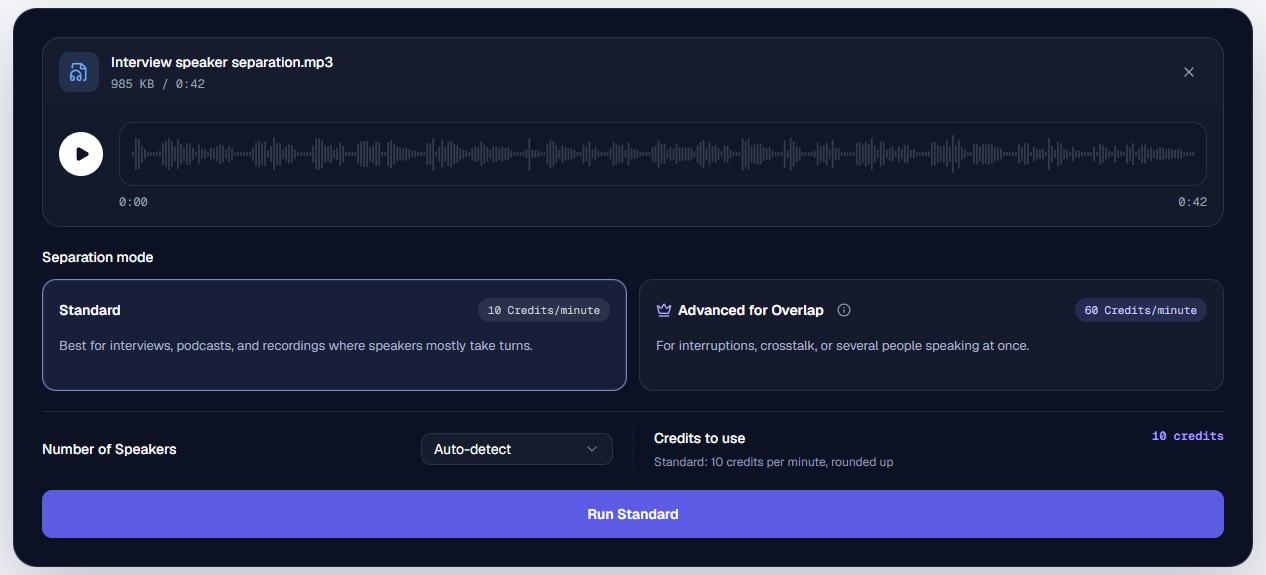
Use Standard when people mostly take turns. Under Number of Speakers, choose 2 Speakers if you know there are two people, or leave Auto-detect selected. Check Credits to use, then select Run Standard.
 Open full-size image ↗
Actual workspace screenshot: Standard and Auto-detect are selected. This 0:42 recording has a 10-credit estimate. Run Standard starts the separation after you review these settings.
Where to choose 2 Speakers
 Open full-size image ↗
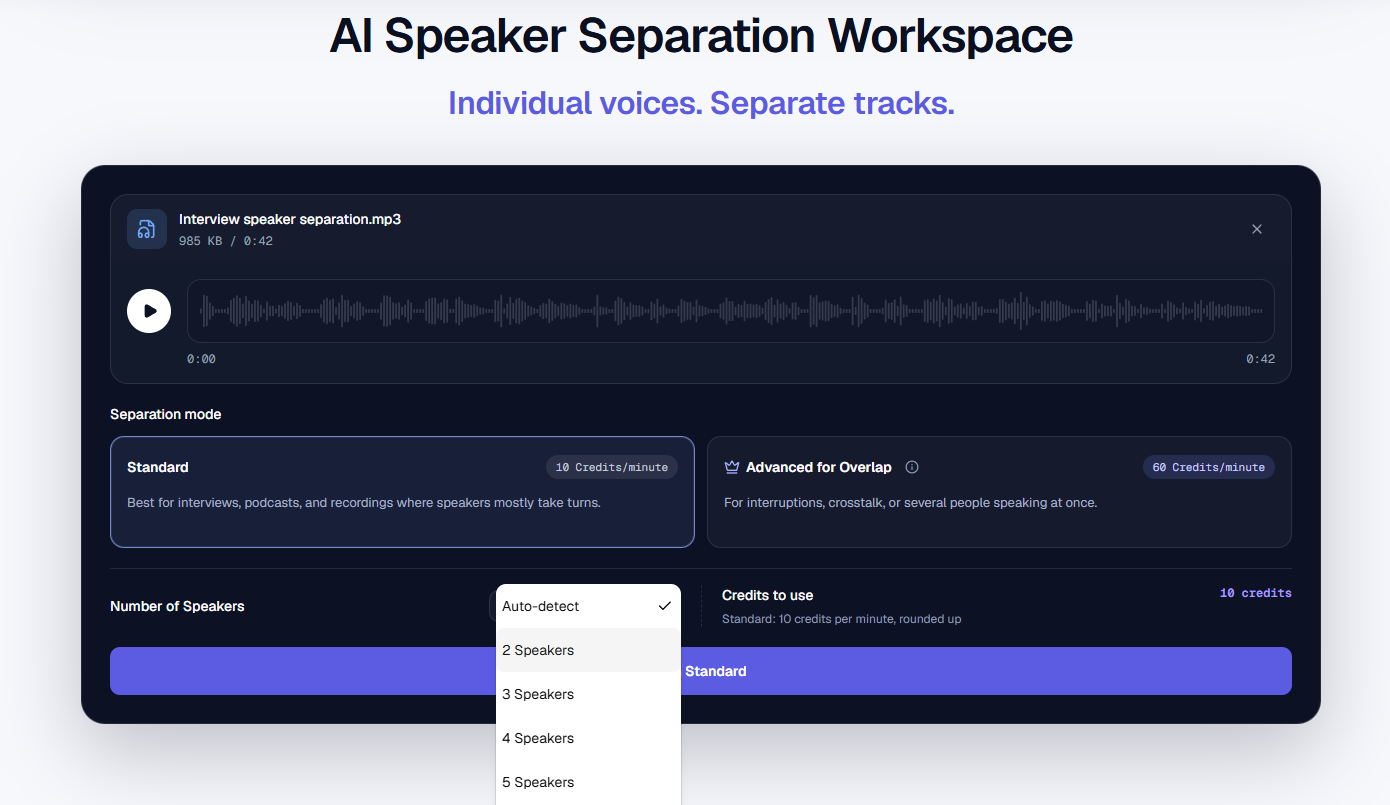
Open Number of Speakers and select 2 Speakers to set a known count. The checkmark in this screenshot is still beside Auto-detect; it does not show a manual count already selected.
Use Advanced Overlap for people interrupting or speaking at the same time. It detects the speaker count automatically and requires a successful purchase. It has a higher credit rate, so check the estimate before starting. See the overlapping voices guide for an actual comparison.
3. Listen to each voice and download the WAV files
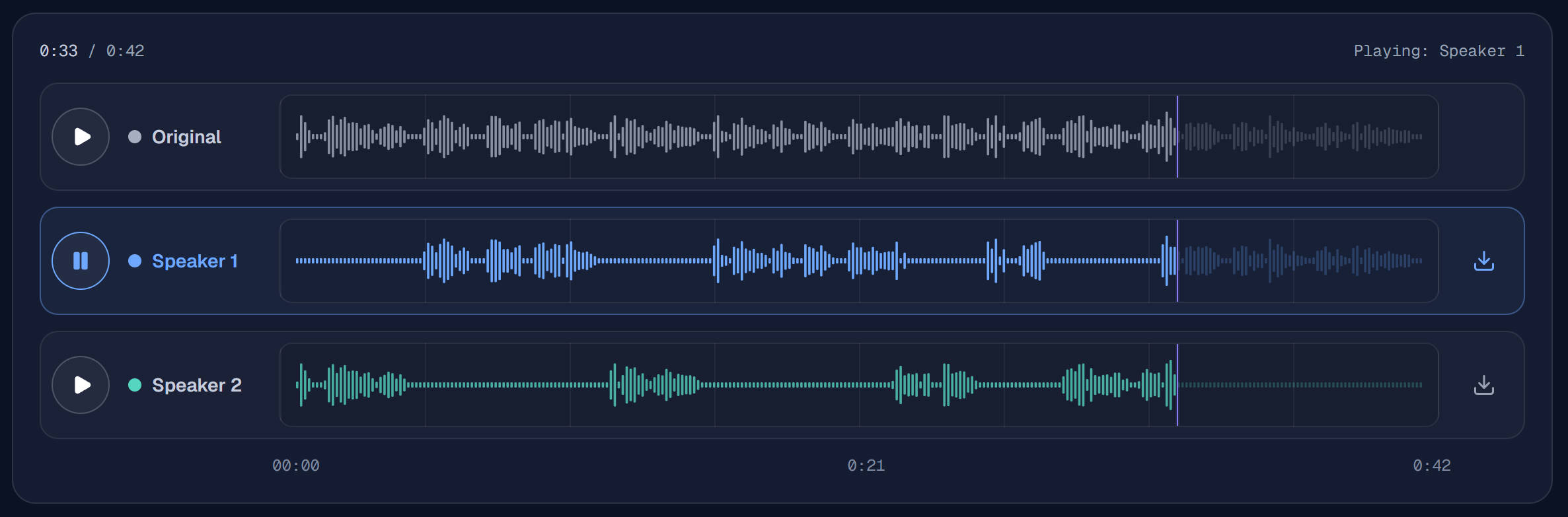
When processing finishes, play Original, then Speaker 1 and Speaker 2. Check a few moments near the beginning, middle, and end so you know which voice each track contains. Pay particular attention to interruptions. Speaker numbers are labels within that task, not verified identities or a fixed order across recordings.
 Open full-size image ↗
Actual result screenshot: Speaker 1 is selected at 0:33 of a 0:42 recording. Use the play control on the left to preview a voice and the download arrow at the right of each speaker row to save its WAV. Listen to both rows before deciding which person each contains.
Download both speaker WAVs for a two-track edit. Each file keeps the source recording's time positions, including pauses while that person is silent. An MP3 input still produces WAV outputs. If you only want one person's track, follow the single-voice guide.
Hear one mix and two Standard WAV tracks
This shared example uses a 42-second original dialogue voiced with licensed TTS, with actual Seply Standard outputs from September 6, 2026. It is a synthetic demonstration, not a customer recording. The saved audio below is the existing interview test, not a new processing run made for these screenshots.
Switch between Original mix, Standard — Interviewer, and Standard — Maya at the same position, then download either WAV using its row's download control. The names are editorial labels for the known dialogue; they do not establish which numbered row contains that person in another task.
The original timing remains in both files: a flat section can be a pause while the other person speaks, not a shortened export. Check the interruptions too—this sample retains some crosstalk in Standard. See the interview test and source conditions for the processing details and listening observations. One short example cannot predict the result for every conversation.
What can you do with the separate tracks?
- Balance two different volumes: import both WAV files into your editor and turn the quieter person up.
- Edit a conversation: adjust an interruption on one track without lowering both voices. Follow the interview workflow for an example.
- Prepare a podcast: adjust the host and guest separately using the podcast editing workflow.
Place the WAV files at the same timeline start in your editor. Mute the original mixed track while playing the separated tracks to avoid hearing the recording twice; keep it available for comparison.
Common questions before you start
Can I use a single WAV or MP3 containing both speakers?
Yes. The point of speaker separation is to work from one mixed conversation. MP3 and WAV are both supported; a less-compressed original can preserve more detail. The output is WAV even when the input is MP3.
What if the recording has more than two people?
Use automatic detection, or choose a known count of up to 10 in Standard. Review every output because a brief guest appearance or a similar voice can be assigned incorrectly.
Can I do this for free?
New accounts receive 20 one-time trial credits, valid for 30 days. They are shared between supported features, so using credits for transcription leaves fewer for separation. Advanced is not included in the Standard trial. The current rates, billing increments and file limits are listed below; always review the estimate for your file.
Can I download the tracks later?
Yes. Reopen the completed task in your history during its private 30-day result-access period, unless you deleted it earlier. Save the WAV files before that access period ends.
What if I only need a transcript with speaker labels?
Use Speech to Text for text rather than audio tracks. You do not need to separate the audio first for an ordinary speaker-labeled transcript. The comparison guide shows the difference between the two outputs.
When the voices do not separate cleanly
Strong echo, loud music, clipping, similar voices, or sustained overlap can leave one person's voice in another track. Compare the difficult passage with the original. Try an earlier, less-processed source if you have one; use the overlap guide when simultaneous speech is the main problem.
Formats and limits
- Accepted input
- Standard:WAV, MP3, M4A, AAC, FLAC, MP4, MOV.
Advanced Overlap: WAV, MP3, M4A, AAC, FLAC, MP4, MOV. MP4 and MOV must contain AAC or PCM audio. - Output
- One time-aligned WAV track per detected speaker
- Upload limit
- Up to 1 GB; Advanced Overlap: up to 90 minutes
- Billing increment
- Standard Separation: 10 credits per started minute, 10-credit minimum.Advanced Overlap: 60 credits per started minute, 60-credit minimum.
The server-calculated duration is rounded to the nearest whole second before billing. Check the exact credit estimate before processing.Advanced Overlap requires a successful purchase; trial credits cover Standard Separation.
Private processing
Uploads and results are available only to the signed-in account.
30-day result access
Completed source media and outputs are retained privately for 30 days, or until deleted.
Secure result delivery
Completed files are delivered through your signed-in account for private preview and download.
Upload only recordings you own or have permission to process.