Speaker separation creates a separate audio track for each detected voice. Speaker diarization assigns speaker labels to time ranges; transcription supplies the words. Choose separation for editable audio, or transcription with diarization to read, search, subtitle, or analyze a conversation. Diarization alone does not produce a transcript or identify a person by name.
For an example of the combined workflow, Google Cloud's speaker diarization documentation describes attaching numbered speaker labels to recognized words. This explains the distinction; it is not a claim about Seply's underlying provider.
One conversation, three different outputs
Imagine a six-second recording: Speaker 1 asks “When do we start?” at 00:00–00:02. Speaker 2 answers “We start at ten.” at 00:03–00:05.
Illustrative example: the dialogue, times, and filenames below were written to explain the difference. They are not actual Seply processing results or downloadable files.
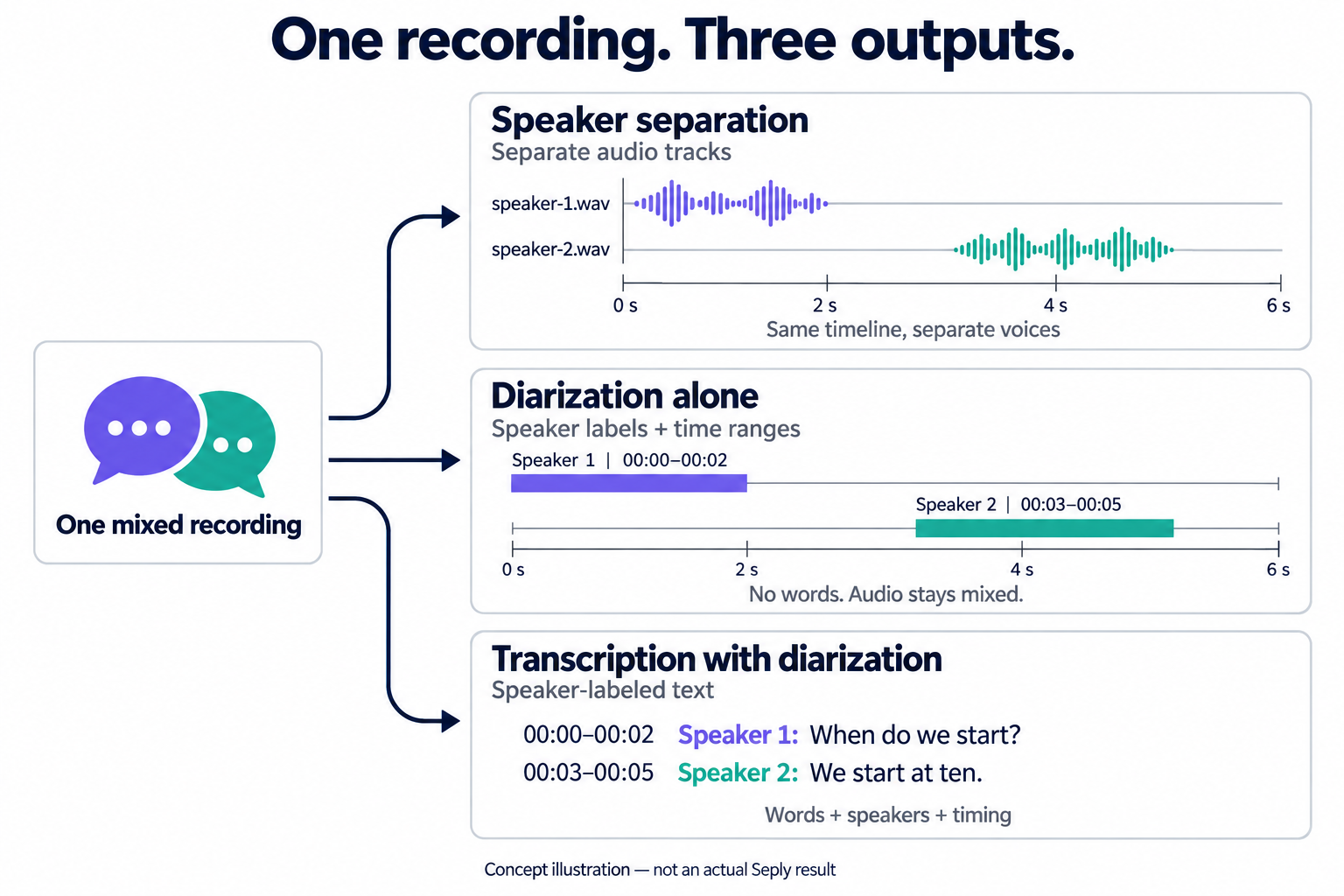
| Method | Illustrative output | What it lets you do |
|---|---|---|
| Speaker separation | speaker-1.wav: the question at 00:00–00:02.speaker-2.wav: the answer at 00:03–00:05.Both files keep the full six-second timeline, including pauses. | Adjust or mute one voice in an audio editor. Seply exports WAV tracks; residual crosstalk can remain. |
| Diarization alone | 00:00–00:02 · Speaker 1 00:03–00:05 · Speaker 2 No words and no separate audio tracks. | Locate speaker turns or measure speaking time. Labels distinguish voices without verifying people's names. |
| Transcription with diarization | 00:00–00:02 · Speaker 1: “When do we start?” 00:03–00:05 · Speaker 2: “We start at ten.” | Read and find quotes by speaker, or prepare captions. The words come from transcription; the audio remains mixed. |
The labeled text above shows the concept, not a promise that every export format includes names and timestamps. In Seply, TXT contains the text; SRT includes timestamps and speaker names, and VTT carries speaker tags. See the interview transcription workflow for reviewing and exporting text.
A 30-second decision test
Ask what the next person in the workflow needs:
- If an editor needs separate control over each voice's volume or effects, use speaker separation. Check for speech leaking between tracks before relying on an edit.
- If a producer, researcher, or writer needs to know who said each sentence, use speech to text with diarization.
- If you need both editable tracks and searchable dialogue, run both workflows from the same authorized source recording.
For example, a podcast editor may separate the host and guest before mixing, while the show-note writer uses a diarized transcript to find quotes. Neither output replaces the other.
Need audio tracks?
Separate the speakers, preview each voice, and download time-aligned WAV files.
Open Speaker SeparationNeed a speaker-labeled transcript?
Transcribe the original recording with diarization, then review the words and speaker labels.
Open Speech to TextHow each method treats overlapping speech
Overlap is where the difference becomes easiest to hear. In a mixed recording, two people may speak at the same instant.
Speaker separation tries to reconstruct the voices into distinct, synchronized tracks. A successful result lets an editor reduce one interruption or rebalance a quiet guest while preserving the timeline. Listen to the shared Seply demonstration below to compare the original mix with two separated tracks.
Shared Seply demo
Compare the mix with each speaker track
19 seconds · two speakers
This is the same public demonstration used on the Seply homepage. It is evidence of one example, not a universal accuracy claim.
Diarization assigns speaker labels to time ranges without splitting the audio. Some systems can label simultaneous speech, but overlap handling varies. Adding transcription may produce words for those ranges; it does not guarantee that both speakers' words will be recovered. For mode selection and listening checks, see how to handle overlapping speech.
When to use both
A combined workflow is useful when the deliverables include edited media and text:
| Workflow stage | Recommended tool | Deliverable |
|---|---|---|
| Dialogue cleanup | Speaker separation | Individual WAV tracks |
| Quote finding | Speech to text with diarization | Searchable speaker-labeled transcript |
| Caption preparation | Speech to text | SRT or VTT |
| Final mix | Audio or video editor | Published episode or interview |
Keep the original recording as the reference. Separation and transcription are derived working files, and either can contain mistakes that are easier to spot against the source.
You do not need to separate the recording first for an ordinary speaker-labeled transcript. If you edit the audio by cutting or moving passages, transcribe the final edit when you need captions that match its new timing.
Cost and file rules in Seply
Seply shows the mode, file limits, and credit estimate before processing. Separation and transcription use the same credit balance at different rates; running both uses credits for each job. Advanced Overlap requires a successful purchase. See plans and credits for purchase options.
For input formats, output files, and billing details, follow the step-by-step separation guide or the interview transcription workflow.
Choose the deliverable you need
Choose speaker separation for audio tracks, diarization alone for speaker time ranges, and transcription with diarization for speaker-labeled text. Match the output to your next task: editing the sound, locating turns, or working with the words.