To separate two voices talking at the same time, upload your recording to Seply, choose Advanced, and preview the individual speaker tracks. Download the WAV files you need, then bring them into your editor to adjust each voice separately.
Your guest starts an answer just as you ask another question. Both voices are in one recording, and turning down the interruption also turns down the answer. Separation can help, but some of the other voice may remain even in Advanced outputs.
Open the speaker separation tool, then follow the steps below.
On this page: steps · hear a result · choose a mode · closer comparison.
Separate overlapping voices in five steps
1. Check which recording you have
If each person already has a separate microphone track, listen to those originals first. You may only need to adjust their levels in your editor. If both voices are mixed into one file and speak at the same time, continue with separation.
Focus on the moments that matter. A quiet laugh or brief agreement may sound natural; an interruption that covers an important answer is more useful to work on.
2. Prepare and upload the recording
Use the clearest original you have, preferably before heavy noise reduction or other cleanup. Open Seply, sign in, and select your audio or compatible video file. Check the filename so you know you are processing the right recording.
For a shorter test, trim an excerpt in an external editor first. Keep some solo speech before and after the overlap, so you can recognize each voice and compare its sound. Note where the excerpt starts in the original recording. Seply does not perform this trimming step.
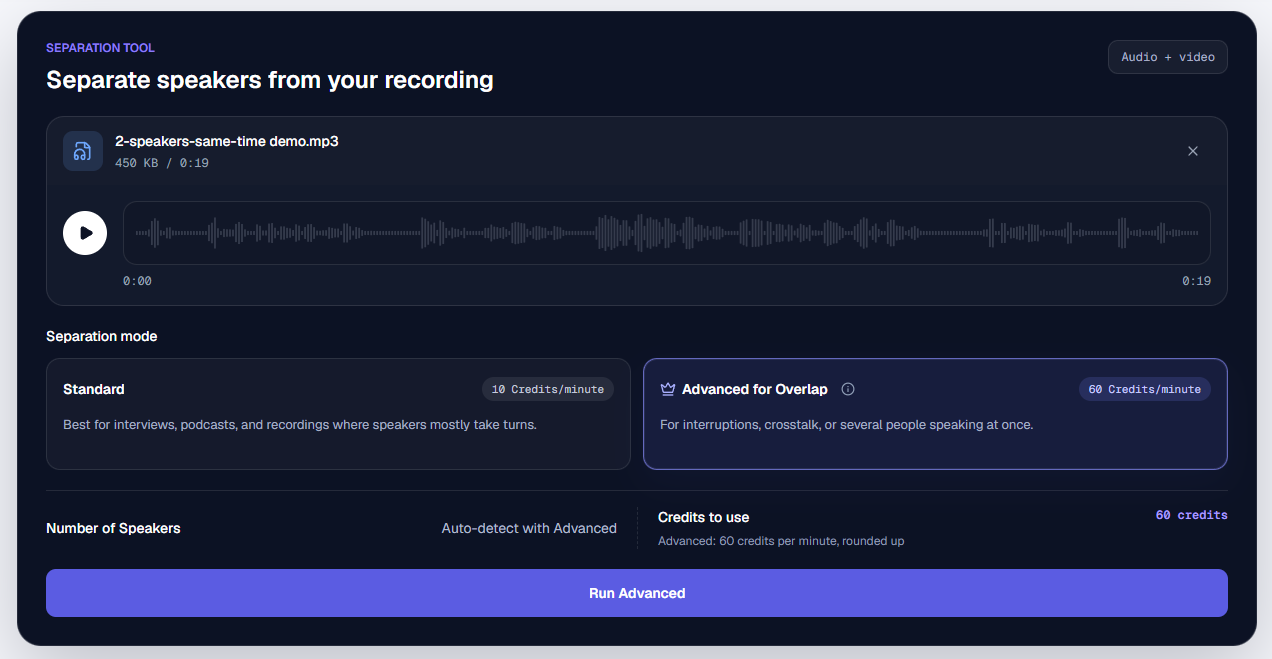
3. Choose Advanced and check the estimate
Select Advanced for Overlap (the Advanced mode) for voices talking at the same time. It detects the speakers automatically; you do not need to enter their names or upload a voice sample.
Review the displayed duration and estimated credits before starting. Advanced requires a successful purchase and enough available credits for the job. The mode and cost comparison below explains the rates and Standard trial; pricing lists purchase options. Start processing once the recording and mode are correct.
4. Preview each voice and download the tracks
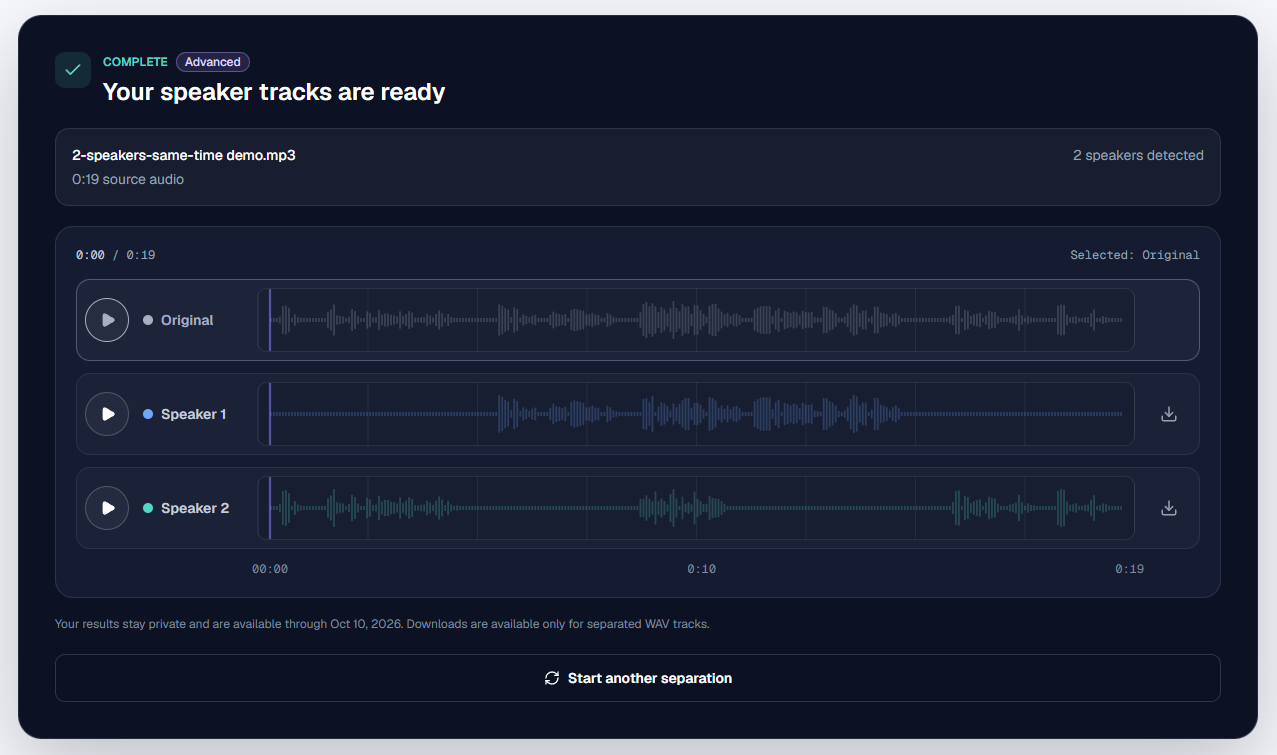
Listen to the original where the speakers overlap, then switch between the outputs at the same moment. Check whose voice is on each track and whether the words you need are complete. Listen to a nearby solo passage too, so you can compare the sound of the voice.
Download the WAV tracks you need. If a word seems missing, check the other outputs before discarding anything. The tracks keep the recording's timing, so silent gaps when a person is not speaking are expected.
5. Bring the tracks into your editor
Import the WAVs into your audio or video editor. For a full recording, place them at the same starting point as the original. For a trimmed excerpt, place all its outputs at the original position you noted in step 2.
Mute the original mixed track while playing the separated tracks, so you do not hear both versions together. Adjust one person's level or edit an interruption, then listen to the conversation in context. These changes happen in your external editor; Seply supplies the separated audio.
Hear the difference during overlapping speech
This first example is a 19.20-second TTS-generated conversation processed with both modes. Listen to the original, then switch between the four outputs to hear the result at the same point.
Hear how each mode handles overlapping voices.
19.20-second TTS conversation · two speakers · original Seply outputs
Listen from 8 to 11 seconds, when both people speak. In this example, the Standard outputs have a hissy texture and a noticeable change in voice tone. The Advanced outputs sound clean, with no noticeable change in tone compared with the solo speech. We recommend Advanced for recordings where overlapping voices are the main problem.
These are Seply's listening observations for this sample. The second example below shows a different conversation and explains what still needs checking.
What to do if the result still needs work
| What you hear | What to try next |
|---|---|
| The other person is still audible | Check each output on its own and in the final mix. Decide whether the remaining voice is distracting. Local volume changes may help, but muting a section also removes the wanted speech on that track at that moment. |
| A word is missing or appears on the wrong track | Compare the original and every output at that moment. Use another microphone recording or an alternate take if available when the words remain unclear. |
| The voice sounds thin, hissy or different during overlap | Try a clearer, less-processed source if you have one. Repeated strong cleanup can further change the voice you want to keep. |
| You hear doubled audio or the voices are out of sync | Mute the original mix and check the WAVs' starting points. A trimmed excerpt belongs at its original timeline position, not at the beginning of the full recording. |
Standard or Advanced: which should you choose?
Choose based on the conversation you need to edit. Standard is a starting point when people mostly take turns. Advanced is our recommendation when simultaneous speech is the main problem. These are Seply's two modes, not a comparison of different services.
| What to consider | Standard Separation | Advanced Overlap |
|---|---|---|
| Best starting point | People mostly take turns | Simultaneous speech is the main problem |
| Processing cost | 10 credits per started minute; 10-credit minimum | 60 credits per started minute; 60-credit minimum |
| Trial access | 20 trial credits cover up to about 2 minutes | Requires a successful purchase and at least 60 available credits; the 20-credit trial alone is not enough |
| Speaker count | Automatic detection or a known count from 2 to 10 | Automatic detection |
Billing uses the server-measured duration, rounded to the nearest whole second before applying the minute increment. Check the estimate before processing. Both modes provide time-aligned WAV tracks; they do not finish your audio or video edit.
For a long recording, you can prepare a representative excerpt in an external editor first. Include the difficult overlap and nearby solo speech, then decide whether the result meets your needs before processing the full file.
A closer comparison: where differences remain
This is a different, 21.76-second TTS conversation, with a reference script below. It helps explain why checking individual words is useful even after choosing Advanced.
Advanced can still leave a faint trace of the other speaker in some cases. In this example, it sounds cleaner during overlap, but the separation is not perfect.
Same recording, two modes. Compare the overlapping voices.
21.76-second TTS conversation · two male speakers · original Seply outputs
- Reading the real waveform
- Reading the real waveform
- Reading the real waveform
- Reading the real waveform
- Reading the real waveform
Switch tracks at the same moment. Overall, Advanced performs better in this sample, with cleaner sound and more consistent voice quality during overlap. Neither mode is perfect; Advanced still has faint voice leakage. Files play at their supplied levels, without additional cleanup.
Follow the reference script
The eight lines below belong only to this second example. Speaker 1 and Speaker 2 match the audio labels; the overlap markers identify which lines meet, not the full timing of each sentence.
| Speaker | Reference dialogue | Passage |
|---|---|---|
| Speaker 1 | The best part of that trip was the little cabin. | Overlap 1 |
| Speaker 2 | Wait, you're forgetting the hike up to the lake! | Overlap 1 |
| Speaker 1 | That's true. We got lost twice before we found it. | Solo |
| Speaker 2 | And you kept saying you knew a shortcut. | Solo |
| Speaker 1 | I still think my route had the better view. | Overlap 2 |
| Speaker 2 | Your shortcut added three extra miles to the walk! | Overlap 2 |
| Speaker 1 | Okay, next time you can navigate. | Solo |
| Speaker 2 | Deal. And you're carrying the snacks. | Solo |
What to listen for
| Passage in the second example | What Seply's listening review found | How to check it |
|---|---|---|
| 0.65–2.70 seconds | Standard placed Speaker 2's “Wait” on Speaker 1's track. The word belongs to the wrong speaker output. | Play the original, then use Hear “Wait” on Standard Speaker 1. |
| 11.38–14.05 seconds | Standard has a hissy texture and a change in voice tone during overlap. Advanced sounds cleaner and more like the nearby solo speech. | Start at Overlap 2, switch between the four outputs, and compare with a solo passage. |
| 11.38–11.96 seconds | On the Advanced output, Speaker 1 remains faintly audible on Speaker 2's output. | Use Hear residual voice on Advanced Speaker 2 and listen for the quieter voice. |
A word landing on the wrong track is a speaker attribution error. A faint second voice is residual crosstalk, or voice leakage. The hissy texture and altered tone are examples of separation artifacts. The practical question is whether the words and sound you need work in your edit.
If you want a voice to play on its own, check it in headphones as well as in the final mix. A trace that blends into a conversation can be distracting in a solo clip. Keep the original so you can check uncertain words before using a result in an edit or quote.
About these examples
- Source and method: both examples are supplied TTS-generated conversations, each processed with Seply's Standard and Advanced modes. They are synthetic demonstrations, not customer interviews. The second example includes the reference script used to make it, not an automatically recognized transcript.
- File checks: the first set contains five 19.20-second files; the second contains five 21.76-second files. All are 44.1 kHz. In both sets, the MP3 mix and Advanced WAVs are stereo, while Standard WAVs are mono.
- Playback: the supplied files have not been additionally cleaned, normalized or re-encoded for this page. Differences in volume or channel count do not by themselves prove better separation. Waveforms are scaled for navigation, not quality measurement.
- Listening review: the notes are Seply's own supplied observations, not an independent benchmark or an objective accuracy score. The page's updated date is the editorial date, not a claimed processing date.
- Limits: two short synthetic examples cannot establish how every real recording will perform. Similar voices, long overlaps, echo, clipping or music can change the result. Neither example supports a guarantee of perfect separation.
Common questions
Can I separate overlapping voices for free?
You can listen to both examples here for free. The 20-credit trial covers up to about 2 minutes of Standard. Processing your own recording with Advanced requires a successful purchase and at least 60 available credits. The 20-credit trial alone is not enough to run Advanced. Check the mode table above for current rates.
Will noise reduction remove the other speaker?
Noise reduction is intended to reduce background noise. Another person speaking at the same time is also speech, so ordinary noise reduction does not necessarily separate the two voices. Use speaker separation to get individual tracks, then decide whether further cleanup is useful.
What if I only want to keep one person's voice?
Separate the conversation first, preview the outputs to find the person you need, and download that track. The single-voice extraction guide explains how to confirm the right speaker and handle silent gaps.
Will I get a transcript or an edited video?
This workflow outputs audio tracks. It does not finish your video edit or automatically produce a transcript. Use the separate Speech to Text tool if you need text with speaker labels, and check words spoken during overlap carefully.
Formats and limits
- Accepted input
- Standard:WAV, MP3, M4A, AAC, FLAC, MP4, MOV.
Advanced Overlap: WAV, MP3, M4A, AAC, FLAC, MP4, MOV. MP4 and MOV must contain AAC or PCM audio. - Output
- One time-aligned WAV track per detected speaker
- Upload limit
- Up to 1 GB; Advanced Overlap: up to 90 minutes
For mostly alternating dialogue, follow the general two-voice separation guide. For interviewer and guest editing, see the interview workflow.
Try these steps with your recording: upload the original, choose a mode and review the credit estimate before starting.