You want to turn the interviewer down without making the guest quieter, or edit a question without cutting into the answer. But both voices are in one mixed recording.
Interview speaker separation gives you a separate, time-aligned WAV for each speaker. Preview the interviewer and guest, download the tracks, then adjust them independently in your editor. Start with the actual example below to hear what changes.
A controlled Standard and Advanced comparison
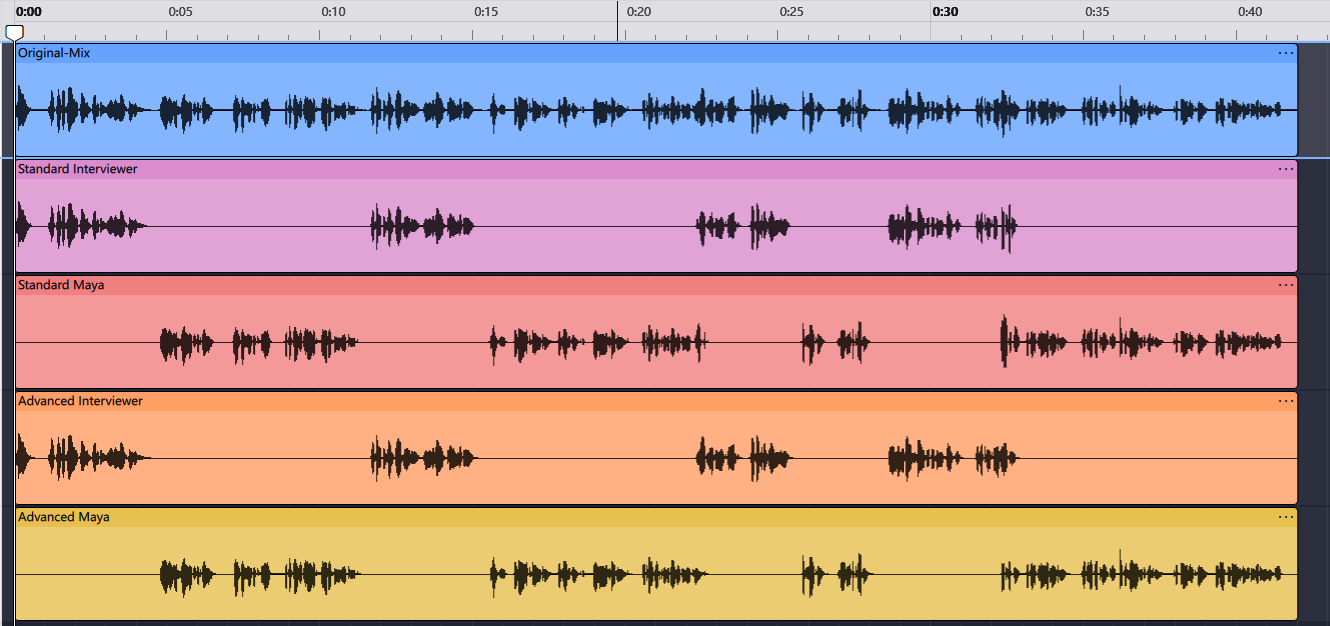
On September 6, 2026, the Seply Editorial Team processed the same authorized 42.031-second interview mix in both modes. The source was original English dialogue voiced with licensed TTS, mixed in Audacity, and contained two speakers with no music or added environmental noise.
Seply field test · September 6, 2026
One source. Two separation modes.
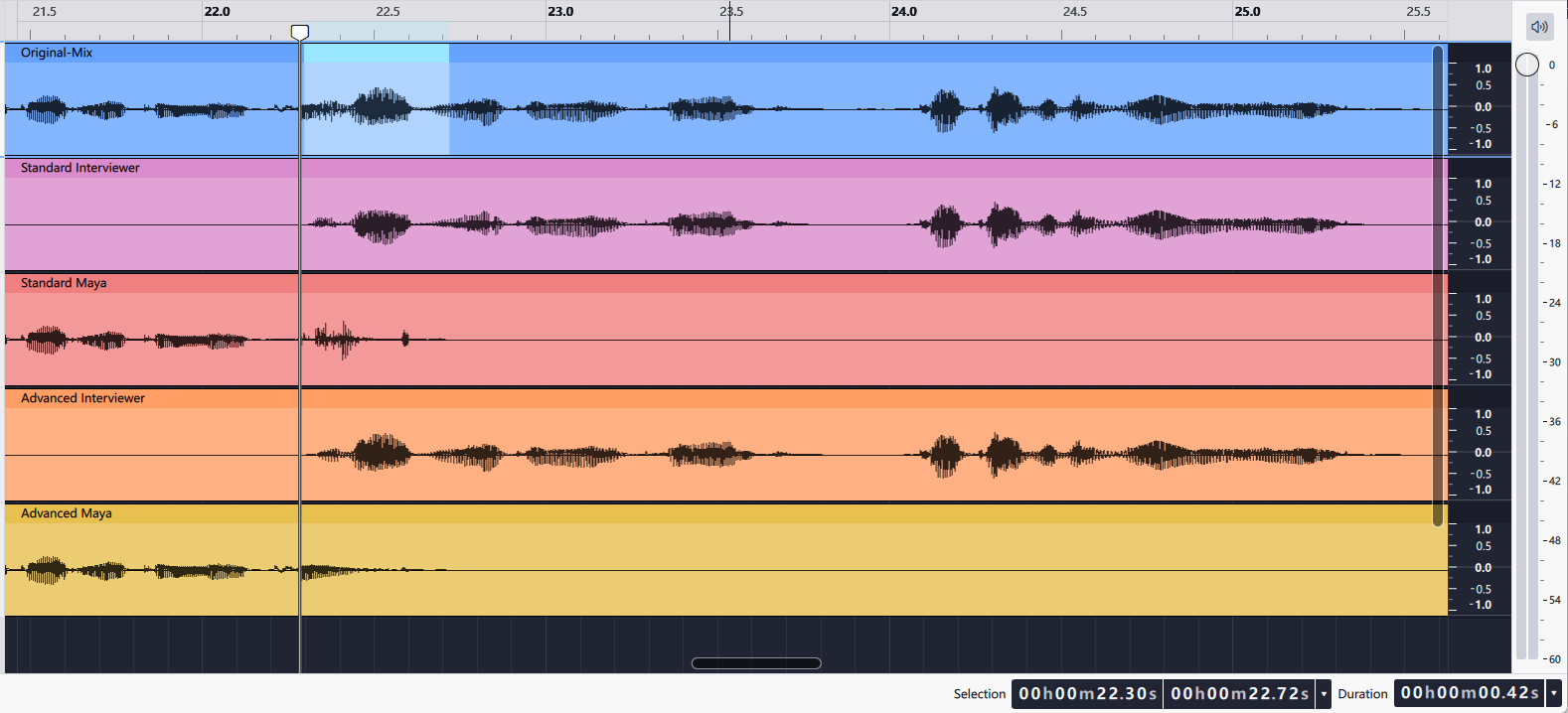
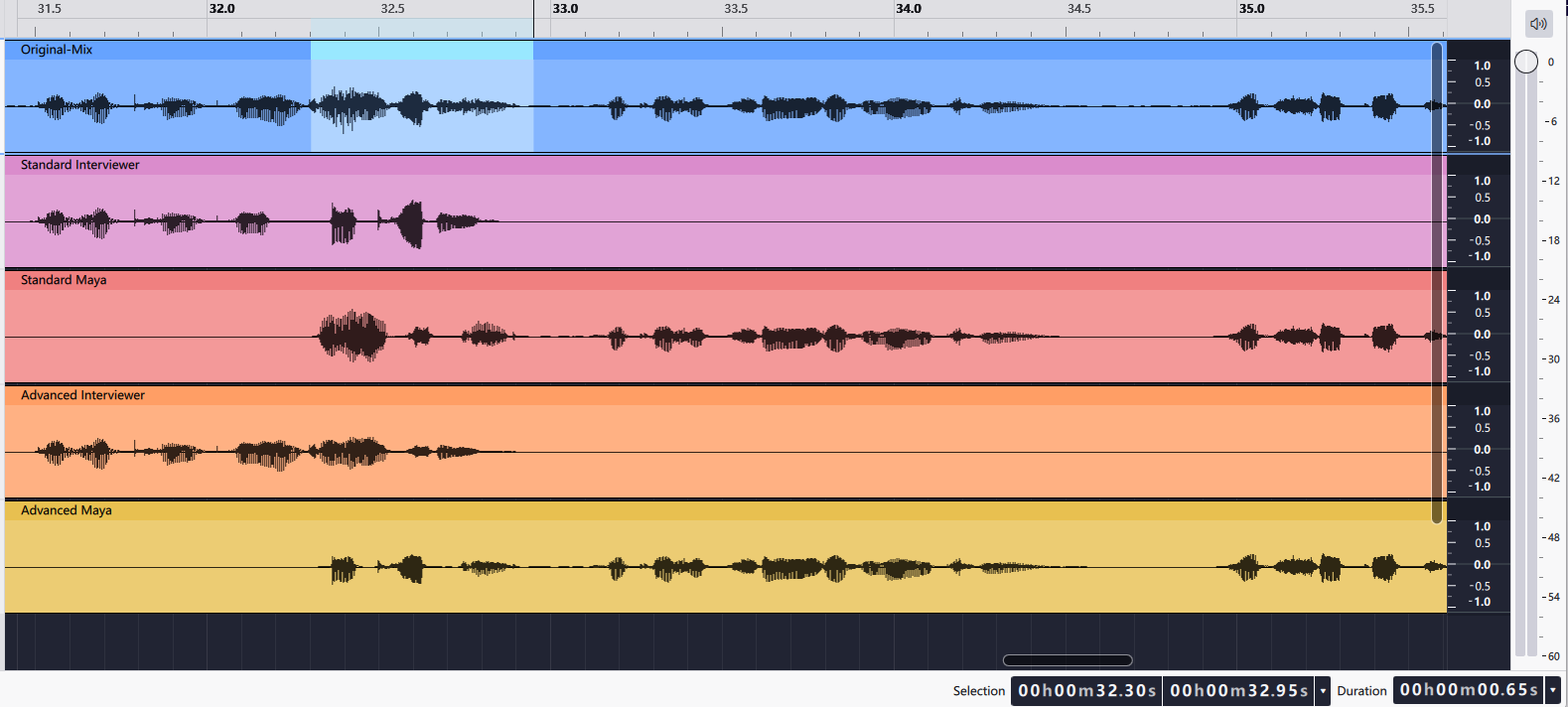
Switch tracks without losing your position, then inspect the same interruption in the source, Standard, and Advanced outputs.
42.031 seconds
2 synthetic English voices
- Authorized source
- Original two-person TTS dialogue, mixed in Audacity with no music or added environmental noise.
- Original mix
- Stereo MP3 · 44.1 kHz · 192 kbps
- Standard
- Known count: 2 · two 16-bit, 44.1 kHz mono WAV tracks
- Advanced Overlap
- Automatic detection · two 16-bit, 44.1 kHz stereo WAV tracks
Synchronized comparison
WAV downloads are the unmodified Seply outputs.
 Open full-size image
 Open full-size image
 Open full-size image
These observations describe one controlled 42-second test, not a universal accuracy result. Identity and wording were checked against the original mix at multiple points.
A measured level difference
The interviewer passage at 28.61–31.00 measured approximately -17.5 LUFS in the source mix. Maya's following passage at 32.95–41.46 measured approximately -20.8 LUFS—about 3.3 LU quieter. These integrated loudness readings were measured from the original mix using EBU R128 analysis; they describe this sample only.
EBU R 128 provides the loudness measurement and normalization framework referenced here. LUFS readings describe loudness, not separation accuracy. The difference between these two passages does not measure voice leakage or establish that either processing mode is better across recordings.
The first overlap lasted 0.42 seconds at 22.30–22.72. In our listening review, residual vocal leakage from the other speaker in the Standard outputs created a faint, diffuse hiss-like texture. We treated this as a separation artifact associated with overlapping speech, not background noise in the source. No obvious noise or crosstalk was audible in the Advanced outputs during the same review. The second overlap lasted 0.65 seconds at 32.30–32.95. Standard contained audible crosstalk; Advanced kept the voice assignment clearer without obvious noise or crosstalk in the reviewed excerpt.
Edit the interviewer and guest in three steps
- Choose the best source. If you already have clean tracks from each microphone, use those. Otherwise upload your mixed interview or compatible camera file. Use only material you have permission to process.
- Separate and listen. Choose Standard for ordinary turn-taking or Advanced Overlap for interruptions and simultaneous speech. Advanced detects the speaker count automatically and requires a successful purchase. Check several known answers against the original to confirm which track contains the guest.
- Adjust each voice in your editor. Download the WAVs, place them at the same timeline start, and mute the original mixed track while playing the outputs. Turn the quieter person up, lower an interruption locally, or remove an unwanted question. Keep the original available for comparison.
Can I keep only the guest's voice?
Yes. Download the guest's separated WAV, or mute the interviewer track in your editor. The single-voice guide walks through identifying the right track, downloading it, and checking its pauses and remaining crosstalk. Muting the interviewer does not guarantee every trace of their voice disappears from the guest's track.
Editorial choices by interview type
- Journalism: preserve wording and context. If a processed word is uncertain, verify it from the original or with the source before quoting.
- Documentary: use separation to build a cleaner mix, but maintain room tone and natural reactions where they support the scene.
- UX research: separation can make facilitator prompts easier to reduce, while diarized transcription is often the better artifact for analysis.
- Oral history: retain the untouched original as the archival record; treat separated tracks as access copies.
- YouTube interviews: align the WAV tracks under the original video and make dialogue edits before loudness finishing.
Failure cases to plan for
If interruptions are the main problem, use the marker method in how to handle overlapping speech. For complete setup and review steps, see how to separate speakers in one audio file.
When the deliverable is text
Audio tracks are useful for editors; researchers and writers may instead need searchable text, speaker labels, timestamps, and captions. In that case, use the interview transcription workflow, or run both products from the same authorized source.
Formats and limits
- Accepted input
- Standard:WAV, MP3, M4A, AAC, FLAC, MP4, MOV.
Advanced Overlap: WAV, MP3, M4A, AAC, FLAC, MP4, MOV. MP4 and MOV must contain AAC or PCM audio. - Output
- One time-aligned WAV track per detected speaker
- Upload limit
- Up to 1 GB; Advanced Overlap: up to 90 minutes
- Billing increment
- Standard Separation: 10 credits per started minute, 10-credit minimum.Advanced Overlap: 60 credits per started minute, 60-credit minimum.
The server-calculated duration is rounded to the nearest whole second before billing. Check the exact credit estimate before processing.Advanced Overlap requires a successful purchase; trial credits cover Standard Separation.
Private processing
Uploads and results are available only to the signed-in account.
30-day result access
Completed source media and outputs are retained privately for 30 days, or until deleted.
Secure result delivery
Completed files are delivered through your signed-in account for private preview and download.
Upload only recordings you own or have permission to process.